Learning dbt the Hard Way
I'm tool agnostic and outcome obssessed, but some tools are just imba.
-- Random guy from Seattle
I love seeing dbt gaining popularity. I came across it a long time ago, thanks to that I've been familiar with yaml files and jinja templates when it was crucial in my career progression. No wonder I keep seeing dbt mentioned in every job description. Senior Data Engineer - dbt. Analytics Engineer - dbt. BI Engineer - dbt
So this article walks you through my telegram channel API call, my local DuckDB warehouse and dbt transformations on top of that. Actual data pipeline, and why it matters more than another dashboard tool
What is dbt, really?
Before we touch any code, let me give you the honest one-liner:
dbt is a tool that lets you write SQL and turns it into a tested, documented, version-controlled data pipeline.
That's it. It doesn't move data. It doesn't connect to your APIs. It doesn't replace your warehouse. It just takes SQL files and runs them in the right order, with tests and documentation baked in.
Think of it like this - imagine you have 10 SQL scripts that need to run in a specific sequence. Script 3 depends on Script 1 and 2. Script 7 depends on Script 3. You've been managing this with a Google Doc titled "run these in order". dbt replaces that Google Doc with an actual dependency graph that executes itself.
raw data in your warehouse
        ↓
dbt reads your .sql files
        ↓
builds a DAG (dependency graph)
        ↓
runs them in the correct order
        ↓
clean, tested tables ready for your BI tool
Now you might ask - where does dbt fit in the classic ETL pipeline? It doesn't. dbt is ELT, not ETL.
ETL vs ELT — why it matters
The old way was ETL: Extract → Transform → Load. You cleaned and transformed data before putting it in the warehouse. This made sense when storage was expensive and warehouses were slow.
The modern way is ELT: Extract → Load → Transform. You dump raw data into your warehouse first, then transform it there using SQL. Storage is cheap now. BigQuery, Snowflake, DuckDB - they are fast enough to run transformations at scale.
dbt owns the T in ELT. Everything else — extracting from APIs, loading into the warehouse - that's your Python scripts, Airbyte, Fivetran, whatever you use. dbt takes over once the raw data is already sitting in your warehouse.
Telegram API  ──→  Python script  ──→  DuckDB (raw)  ──→  dbt  ──→  Analytics tables
   Extract              Load                              Transform
The Project: Telegram Channel Analytics
I run a Telegram channel @baddogdata alongside this blog. Every post I publish sits there with views, reactions, and forwards - and I had no idea which content actually performed well.
So the goal was simple: pull all posts from the channel, load them into DuckDB, and use dbt to build analytics tables on top. No cloud, no infrastructure, just a local pipeline that actually works.
Here is the full architecture:
@baddoogdata channel
        ↓
Telethon (MTProto client)     fetch_posts.py
        ↓
DuckDB  →  raw_posts table    local warehouse
        ↓
dbt staging layer             stg_posts (view)
        ↓
dbt marts layer               fct_posts (table)
                              fct_posts_summary (table)
Setting Up
I used uv to manage the project - if you haven't tried it yet, read my previous posts. Fast, clean, no headaches.
mkdir baddogdata_analytics && cd baddogdata_analytics
uv init .
uv add telethon duckdb pandas dbt-duckdb
For dbt to know where your database lives, you need a profiles.yml file at ~/.dbt/profiles.yml:
baddogdata:
  target: dev
  outputs:
    dev:
      type: duckdb
      path: /your/project/path/baddogdata.duckdb
      schema: main
Then initialize the dbt project:
dbt init baddogdata
This creates the folder structure dbt expects:
baddogdata/
├── models/
├── seeds/
├── tests/
├── macros/
└── dbt_project.yml
Extracting Data from Telegram
To pull channel history you need a user-level Telegram session, not a bot token. Bots cannot read channel history - that's a Telegram API restriction. For user-level access you need api_id and api_hash from my.telegram.org.
The extraction script connects as a user, iterates through channel messages, and writes everything into DuckDB:
import asyncio
import duckdb
from telethon import TelegramClient
from datetime import timezone

API_ID   = 0        # your api_id
API_HASH = ""       # your api_hash
CHANNEL  = "baddoogdata"

async def fetch_posts():
    client = TelegramClient("session_user", API_ID, API_HASH)
    await client.start()

    channel = await client.get_entity(CHANNEL)
    posts = []

    async for message in client.iter_messages(channel, limit=200):
        if not message.text:
            continue

        reactions = {}
        if message.reactions:
            for r in message.reactions.results:
                if hasattr(r.reaction, 'emoticon'):
                    emoji = r.reaction.emoticon
                else:
                    emoji = f"custom_{r.reaction.document_id}"
                reactions[emoji] = r.count

        posts.append({
            "message_id":      message.id,
            "date":            message.date.replace(tzinfo=timezone.utc),
            "text":            message.text,
            "views":           message.views or 0,
            "forwards":        message.forwards or 0,
            "replies":         message.replies.replies if message.replies else 0,
            "reactions_total": sum(reactions.values()),
            "reactions_json":  str(reactions),
            "char_length":     len(message.text),
            "day_of_week":     message.date.strftime("%A"),
            "hour":            message.date.hour,
        })

    con = duckdb.connect("baddogdata.duckdb")
    con.execute("DROP TABLE IF EXISTS raw_posts")
    con.execute("""
        CREATE TABLE raw_posts (
            message_id      INTEGER,
            date            TIMESTAMPTZ,
            text            VARCHAR,
            views           INTEGER,
            forwards        INTEGER,
            replies         INTEGER,
            reactions_total INTEGER,
            reactions_json  VARCHAR,
            char_length     INTEGER,
            day_of_week     VARCHAR,
            hour            INTEGER
        )
    """)
    con.executemany(
        "INSERT INTO raw_posts VALUES (?,?,?,?,?,?,?,?,?,?,?)",
        [list(p.values()) for p in posts]
    )
    print(f"Saved {len(posts)} posts")
    con.close()
    await client.disconnect()

asyncio.run(fetch_posts())
Run it once and your raw data is in DuckDB:
uv run python fetch_posts.py
# Saved 33 posts to baddogdata.duckdb
Building the dbt Models
Now the interesting part. dbt models follow a layered architecture — this is the core concept to understand before you write a single line of SQL.
The Three Layers
Staging - one model per source table. No business logic, just cleaning: rename columns, cast types, filter nulls. Always materialized as a view because it's just a lens on raw data, no need to store it.
Intermediate — optional layer for joins and complex business logic. Useful when multiple staging models need to be combined before reaching the final mart.
Marts — the final tables your BI tool connects to. Denormalized, business-friendly, materialized as table so Power BI or Metabase can query them fast.
Staging Layer
-- models/staging/stg_posts.sql
SELECT
    message_id,
    date                                            AS posted_at,
    DATE_TRUNC('day', date)                         AS posted_date,
    DATE_TRUNC('month', date)                       AS posted_month,
    day_of_week,
    hour                                            AS posted_hour,
    text,
    char_length,
    views,
    forwards,
    replies,
    reactions_total,
    reactions_json,
    CASE
        WHEN views > 0
        THEN ROUND((reactions_total + forwards + replies) * 100.0 / views, 2)
        ELSE 0
    END                                             AS engagement_rate
FROM main.raw_posts
WHERE text IS NOT NULL
Notice the CASE WHEN views > 0 — this is defensive coding. You never trust that a denominator is non-zero, especially when data comes from an external API. Even if your channel has never had a zero-view post, the next one might.
Marts Layer
-- models/marts/fct_posts.sql
{{
    config(materialized='table')
}}

SELECT
    message_id,
    posted_at,
    posted_date,
    posted_month,
    day_of_week,
    posted_hour,
    text,
    char_length,

    CASE
        WHEN char_length < 100  THEN 'short'
        WHEN char_length < 300  THEN 'medium'
        ELSE 'long'
    END                                 AS post_length_bucket,

    CASE
        WHEN text LIKE '%baddogdata.com%' THEN true
        ELSE false
    END                                 AS has_blog_link,

    views,
    forwards,
    replies,
    reactions_total,
    engagement_rate

FROM {{ ref('stg_posts') }}
See that jinja template {{ ref('stg_posts') }}? That is the most important thing in dbt. Instead of hardcoding a table name, you reference another model. dbt reads this, builds a dependency graph, and knows it must run stg_posts before fct_posts. You never have to think about execution order again.
-- models/marts/fct_posts_summary.sql
{{
    config(materialized='table')
}}

SELECT
    posted_month,
    day_of_week,
    post_length_bucket,
    has_blog_link,

    COUNT(*)                        AS post_count,
    SUM(views)                      AS total_views,
    ROUND(AVG(views), 0)            AS avg_views,
    ROUND(AVG(engagement_rate), 2)  AS avg_engagement_rate,
    SUM(reactions_total)            AS total_reactions,
    MAX(views)                      AS max_views

FROM {{ ref('fct_posts') }}
GROUP BY 1, 2, 3, 4
Running It
cd baddogdata
dbt run
1 of 3 OK created sql view model main.stg_posts ............. [OK in 0.13s]
2 of 3 OK created sql table model main.fct_posts ............ [OK in 0.05s]
3 of 3 OK created sql table model main.fct_posts_summary .... [OK in 0.03s]

Done. PASS=3 WARN=0 ERROR=0 SKIP=0 TOTAL=3
dbt ran them in the right order automatically. No scripts, no orchestration config, no "run this before that" documentation.
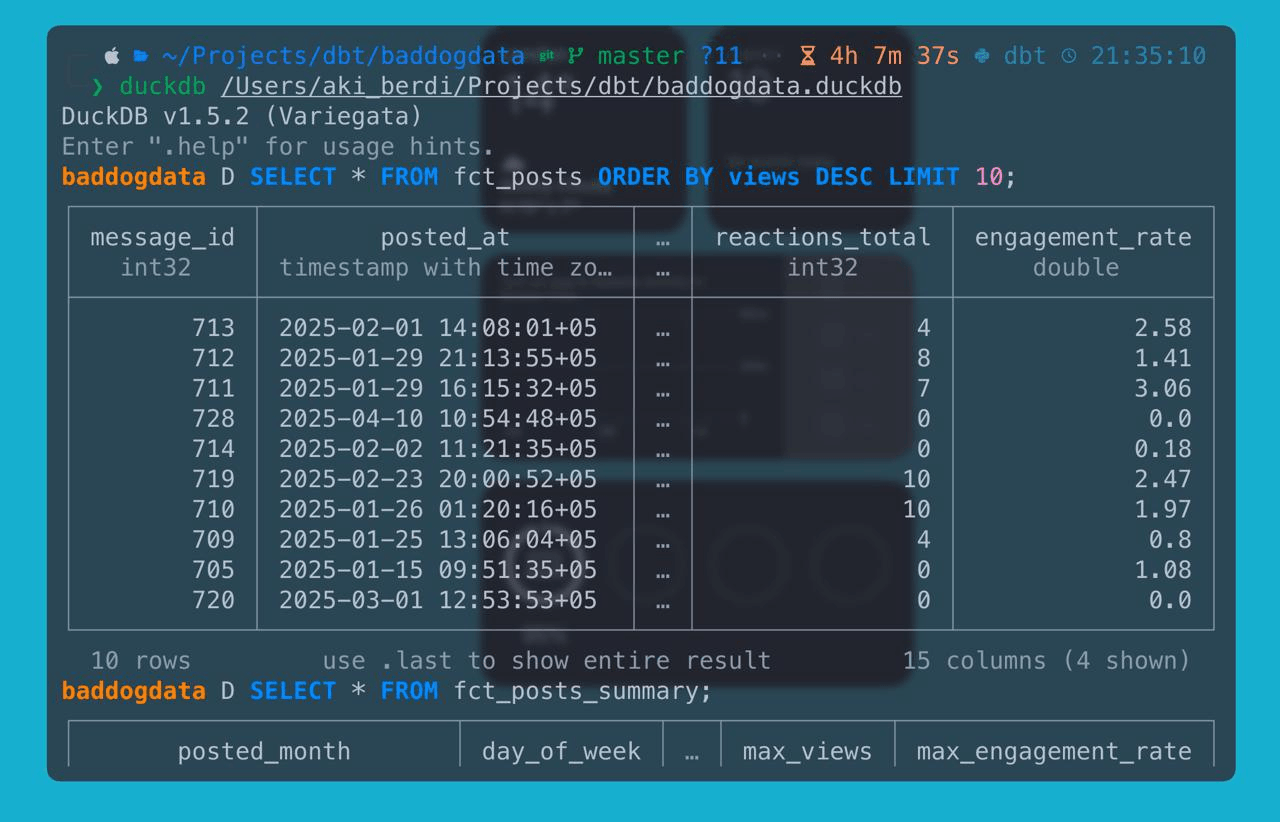
Here is what fct_posts actually looks like once dbt finishes:
Adding Tests
Here is where dbt starts feeling serious. You define tests in a schema.yml file next to your models:
models:
  - name: fct_posts
    columns:
      - name: message_id
        tests:
          - unique
          - not_null
      - name: engagement_rate
        tests:
          - not_null
      - name: views
        tests:
          - not_null
Then run:
dbt test
13 of 13 PASS ................................................

Done. PASS=13 WARN=0 ERROR=0 SKIP=0 TOTAL=13
Every test passed. If one fails, dbt tells you exactly which rows broke it. This is data quality enforcement built into the pipeline — not an afterthought.
Scaling: What This Looks Like in Production
Right now this runs locally on DuckDB. Here is how each piece scales when you move to production.
Incremental Models
Currently fct_posts rebuilds from scratch every run. With 33 posts that's fine. With 33,000 posts in BigQuery, that's expensive. Incremental materialization fixes it:
{{
    config(
        materialized='incremental',
        unique_key='message_id'
    )
}}

SELECT ...
FROM {{ ref('stg_posts') }}

{% if is_incremental() %}
    WHERE posted_at > (SELECT MAX(posted_at) FROM {{ this }})
{% endif %}
First run loads everything. Every run after that loads only new posts. dbt handles the merge logic for you.
Snapshots
Posts accumulate views over time. A snapshot captures the state of a row at a point in time, so you can track how views grew day by day:
{% snapshot posts_snapshot %}
{{
    config(
        unique_key='message_id',
        strategy='check',
        check_cols=['views', 'reactions_total']
    )
}}
SELECT * FROM {{ ref('stg_posts') }}
{% endsnapshot %}
Run dbt snapshot daily and you have a full history of every metric change.
Macros
If the same logic appears in multiple models — like the engagement rate formula — you extract it into a macro:
-- macros/engagement_rate.sql
{% macro calc_engagement(reactions, forwards, replies, views) %}
    CASE
        WHEN {{ views }} > 0
        THEN ROUND(({{ reactions }} + {{ forwards }} + {{ replies }}) * 100.0 / {{ views }}, 2)
        ELSE 0
    END
{% endmacro %}
Then use it anywhere:
{{ calc_engagement('reactions_total', 'forwards', 'replies', 'views') }} AS engagement_rate
Change the formula once, it updates everywhere. No copy-pasting SQL across five models.
Orchestration
In production you don't run dbt run manually. You plug it into a scheduler:
Airflow DAG  (or Cloud Scheduler on GCP)
    → python fetch_posts.py       (extract + load)
    → dbt run                     (transform)
    → dbt test                    (validate)
    → Power BI refresh            (serve)
The entire pipeline runs on a schedule, tests catch data quality issues before they reach dashboards, and you sleep well.
Documentation
This is the feature most people skip and then regret. Run two commands:
dbt docs generate
dbt docs serve
dbt spins up a local website with every model documented, every column described, and a lineage graph showing exactly how data flows from raw_posts through stg_posts into fct_posts and fct_posts_summary.
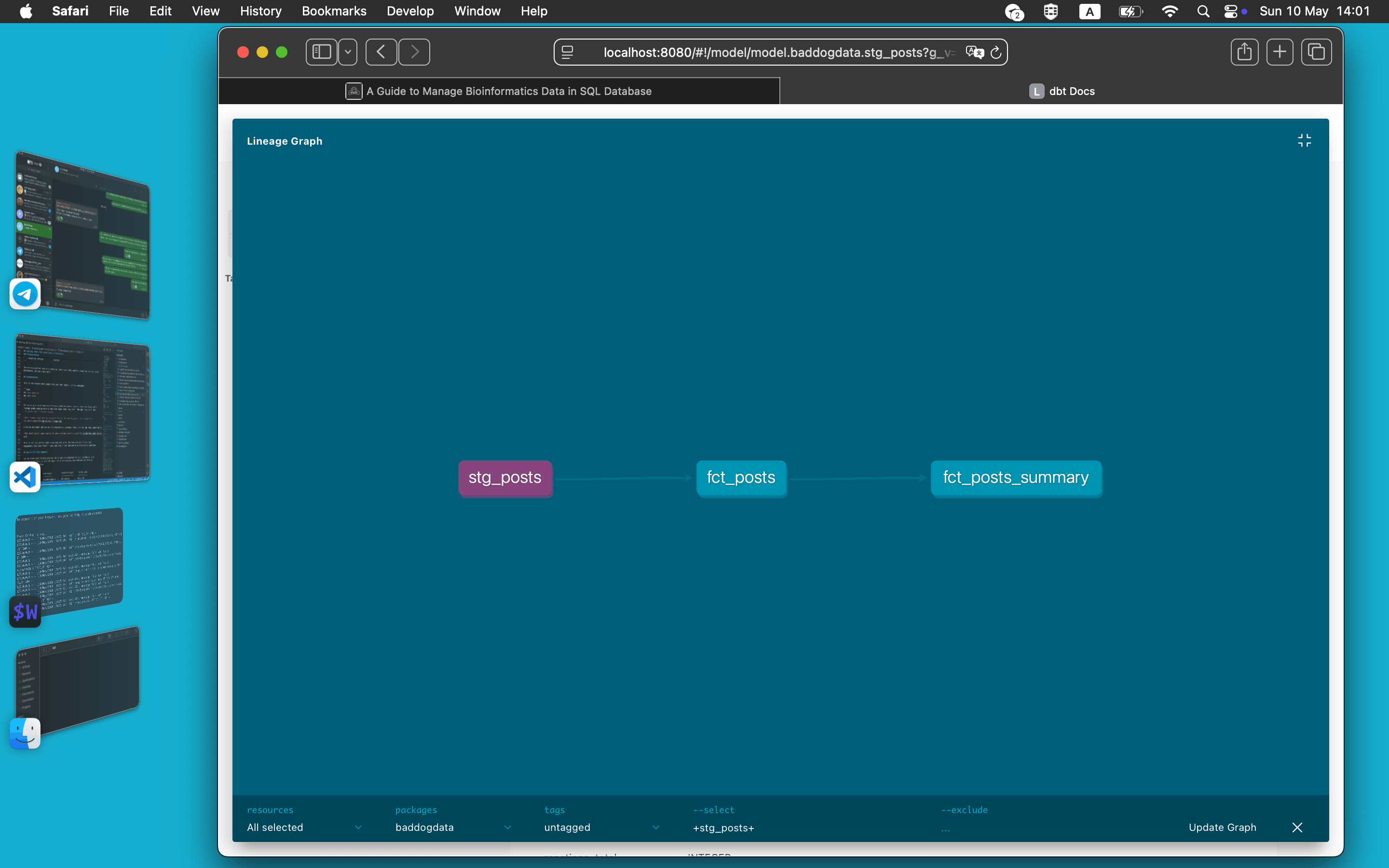
Click on any model and you see its description, columns, tests, and the SQL that generated it.
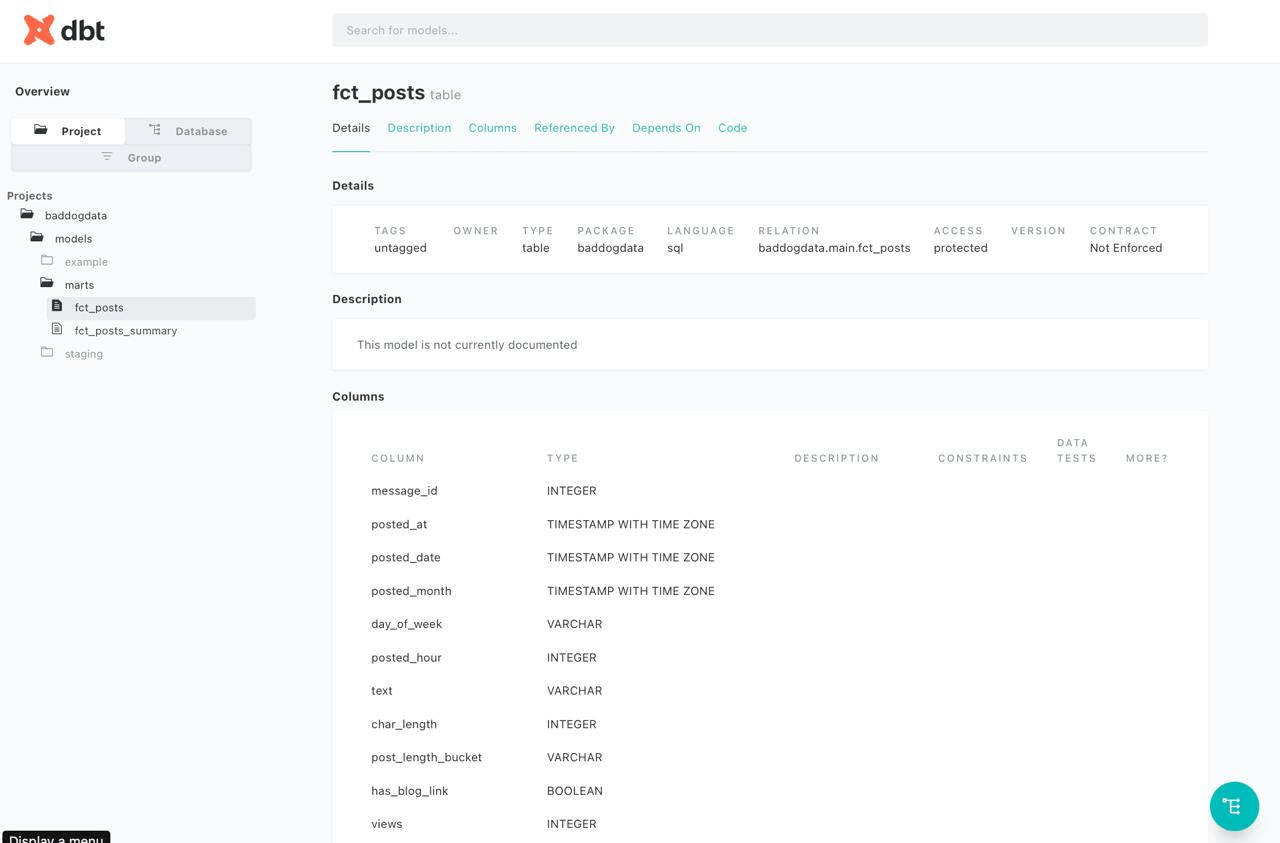
This is not just pretty. When a new engineer joins the team and asks "where does engagement_rate come from?" — you send them a link instead of a 30-minute explanation.
How It All Fits Together
Let me close with the big picture. dbt is not a replacement for your warehouse, your orchestration tool, or your BI layer. It is the missing piece between raw data and analytics-ready tables.
Data Sources          Load Layer           Transform Layer      Serve Layer
─────────────         ──────────           ───────────────      ───────────
Telegram API    →     DuckDB/BigQuery  →   dbt models      →   Power BI
PostgreSQL      →     (raw tables)         (tested, docs)      Metabase
GA4             →                                              your blog
Before dbt, the transform layer was a graveyard of undocumented SQL scripts, Power Query steps nobody understood, and "it works, don't touch it" logic. dbt brings software engineering practices — version control, testing, documentation, modularity — to SQL transformations.
Now Go and build one yourself.
Yours,
Bad Dog